Python source builds as a Codename One application. The build translates each module to Java, compiles it with the rest of the project, and from there it goes wherever Java goes: iOS, Android, the JavaScript port, the desktop ports, the simulator, and native server binaries built on the Codename One backend.
No Python interpreter ships with the application. Each module becomes a Java class, each function a method, and a small runtime supplies Python’s object model, its built-in types and the standard library modules applications use. Annotated code is compiled to unboxed Java arithmetic, so a typed numeric loop runs at the speed of the equivalent Java.
Two things follow from compiling ahead of time rather than interpreting:
The program is known in full at build time. A module imported by a name computed while the program runs,
exec,evalandcompileof a string, and frame introspection are build errors that name the file and the line. None of them reaches a device as a hidden failure.Packages with C extensions are supported. The package’s Python is translated like your own code, and each compiled module is replaced by a Java class with the same functions; see C extensions. The most used ones —
numpy,pydantic's core,yaml's scanner — are already provided, as Codename One implementations of the same public API.
Adding Python to a project
Put the sources in common/src/main/python, or import an existing Python
project into a Codename One application:
mvn cn1:import-python-project -Dsource=/path/to/my-python-app
The import copies the .py files, adds the Python runtime dependency and the
transpile-python goal to the common module, records the entry module and
makes the application’s main class run it. Then build and run the project as
usual; the translation runs in generate-sources. Gradle projects get the
same step as the transpilePython task.
The goal reads these properties:
| Property | Meaning |
|---|---|
| The Python sources, |
| The module run as |
| Where the generated Java goes. |
|
|
Debugging
The translated classes carry the Python source’s file and line numbers in place of the generated Java’s. A stack trace names the Python file and line:
com.codename1.python.runtime.PyException: ValueError: bad 6
	at com.codename1.generated.python.py_app$2eutil.M_L1_Thing_boom(util.py:7)
	at com.codename1.generated.python.py_main.lambda$exec$1(main.py:6)
	at com.codename1.generated.python.py_main.exec(main.py:10)
The same lines reach a Java debugger attached to the simulator or to a server
binary run on the JVM. Each class also carries a JSR-45 source map whose
default stratum, Python, gives the file’s path within the source directory,
for example app/util.py. Breakpoints are set by Python line number, and a
debugger that resolves sources through the source map opens the .py file.
With jdb:
jdb -sourcepath common/src/main/python -classpath ... MyAppStub
stop at com.codename1.generated.python.py_app$2eutil:6
The mapping is applied to the compiled classes by the build’s remap-compat
step (cn1RemapCompat in Gradle), so the generated Java in
target/generated-sources/python still shows the Python line that
each statement came from, as a /* line N */ comment above it.
Calling Codename One and Java from Python
Any class on the project’s class path is importable under the java. prefix:
from java.com.codename1.ui import Form, Button, Label, TextField, Dialog
from java.com.codename1.ui.layouts import BoxLayout


def main():
    form = Form("Hello Python", BoxLayout.y())
    name = TextField("", "Your name")
    out = Label("Hello, world!")

    def on_greet(event):
        out.setText(f"Hello, {name.getText().strip()}!")
        form.revalidate()

    button = Button("Greet")
    button.addActionListener(on_greet)
    form.add(name).add(button).add(out)
    form.show()


main()
A Python function or lambda passed where Java expects a listener or another single-method interface becomes an implementation of that interface. Overloads are chosen at build time when the argument types are known, and otherwise by the runtime from the values passed.
Values cross the boundary as follows:
| Python | Java |
|---|---|
|
|
|
|
|
|
|
|
|
|
|
|
|
|
Java collections behave as their Python counterparts in Python code: len,
indexing, in and iteration work on an ArrayList or a HashMap, and a
Java exception arrives as a Python exception whose message names the Java
type.
To call into Python from Java, import the module through the runtime and call
its attributes. The build generates
com.codename1.generated.python.PythonModules, which registers every
translated module. When Python is the application’s entry point, its main
class calls PythonModules.registerAll() at startup; a Java application
that uses Python as a library calls it once before importing anything:
PyModule pricing = Py.importModule("pricing");
Object total = Py.call(Py.getattr(pricing, "total"), cart);
Building the user interface in Python
The user interface is Codename One’s, called from Python, so everything in
the rest of this guide applies: layouts, themes and CSS, the component
inspector, and the same look on every platform. The examples below are
complete applications. Each is a main.py you can put in
common/src/main/python.
A list loaded from the network
The first example fetches JSON with requests on a worker thread, shows a
progress indicator while it waits and fills a list when the response
arrives. Pull the list down, or tap the toolbar button, to load it again.
import threading

import requests

from java.com.codename1.components import InfiniteProgress, MultiButton
from java.com.codename1.ui import Display, FontImage, Form
from java.com.codename1.ui.layouts import BoxLayout

API = "https://api.github.com/repos/codenameone/CodenameOne/releases"


def fetch_releases():
    response = requests.get(API, params={"per_page": 20}, timeout=15)
    response.raise_for_status()
    return [(r["name"] or r["tag_name"], r["published_at"][:10]) for r in response.json()]


def show_releases(form, releases):
    form.removeAll()
    for name, date in releases:
        row = MultiButton(name)
        row.setTextLine2(date)
        row.addActionListener(lambda e, n=name: Display.getInstance().execute(
            "https://github.com/codenameone/CodenameOne/releases/tag/" + n))
        form.add(row)
    form.revalidate()


def load(form):
    progress = InfiniteProgress().showInfiniteBlocking()

    def work():
        try:
            releases = fetch_releases()
        except requests.RequestException as e:
            releases = [("Couldn't load releases", str(e))]
        # Components belong to the EDT: hand the result back to it.
        Display.getInstance().callSerially(lambda: (progress.dispose(), show_releases(form, releases)))

    threading.Thread(target=work, daemon=True).start()


def main():
    form = Form("Releases", BoxLayout.y())
    form.getToolbar().addMaterialCommandToRightBar("", FontImage.MATERIAL_REFRESH, lambda e: load(form))
    form.getContentPane().addPullToRefresh(lambda: load(form))
    form.show()
    load(form)


main()
Three conventions carry over from Codename One’s Java API:
Network calls run off the event dispatch thread. A Python thread is fine for that, and
callSeriallyhands the result back to the thread that owns the components.A component added to a form that’s already showing appears after
revalidate().A Python function goes wherever an
ActionListeneror aRunnableis expected. A default argument, as inlambda e, n=name: …, captures the loop’s value for each row, as it would in any Python callback.
A model, two forms and storage
The second example keeps notes in SQLite through the standard sqlite3
module, models them as a dataclass and moves between a list and an editor
form. The editor saves when the user goes back, and asks before deleting.
import sqlite3
from dataclasses import dataclass
from datetime import date

from java.com.codename1.components import MultiButton
from java.com.codename1.ui import Button, Dialog, FontImage, Form, TextArea, TextField
from java.com.codename1.ui.layouts import BorderLayout, BoxLayout


@dataclass
class Note:
    id: int | None
    title: str
    body: str
    day: str


class Notes:
    def __init__(self, path: str = "notes.db"):
        self.db = sqlite3.connect(path)
        self.db.execute("CREATE TABLE IF NOT EXISTS note"
                        " (id INTEGER PRIMARY KEY, title TEXT, body TEXT, day TEXT)")

    def all(self) -> list[Note]:
        rows = self.db.execute("SELECT id, title, body, day FROM note ORDER BY id DESC")
        return [Note(*row) for row in rows]

    def save(self, note: Note) -> None:
        with self.db:
            if note.id is None:
                self.db.execute("INSERT INTO note (title, body, day) VALUES (?, ?, ?)",
                                (note.title, note.body, note.day))
            else:
                self.db.execute("UPDATE note SET title = ?, body = ? WHERE id = ?",
                                (note.title, note.body, note.id))

    def delete(self, note: Note) -> None:
        with self.db:
            self.db.execute("DELETE FROM note WHERE id = ?", (note.id,))


class NotesApp:
    def __init__(self):
        self.store = Notes()
        self.home = Form("Notes", BoxLayout.y())
        self.home.getToolbar().addMaterialCommandToRightBar("", FontImage.MATERIAL_ADD,
                                                            lambda e: self.edit(Note(None, "", "", str(date.today()))))
        self.refresh()

    def refresh(self):
        self.home.removeAll()
        for note in self.store.all():
            row = MultiButton(note.title or "Untitled")
            row.setTextLine2(note.day)
            row.addActionListener(lambda e, n=note: self.edit(n))
            self.home.add(row)
        self.home.revalidate()

    def edit(self, note: Note):
        form = Form("Edit", BorderLayout())
        title = TextField(note.title, "Title")
        body = TextArea(note.body, 8, 40)
        form.add(BorderLayout.NORTH, title).add(BorderLayout.CENTER, body)

        def back(e):
            note.title, note.body = title.getText(), body.getText()
            self.store.save(note)
            self.refresh()
            self.home.showBack()

        form.getToolbar().setBackCommand("", back)
        if note.id is not None:
            def delete(e):
                if Dialog.show("Delete", f"Delete '{note.title}'?", "Delete", "Cancel"):
                    self.store.delete(note)
                    self.refresh()
                    self.home.showBack()
            delete_button = Button("Delete")
            delete_button.addActionListener(delete)
            form.add(BorderLayout.SOUTH, delete_button)
        form.show()

    def start(self):
        self.home.show()


NotesApp().start()
The structure is the one a Python developer would write for any user
interface toolkit: a storage class with no user interface code, and a class
that owns the forms and turns model objects into components. show()
moves forward to a form, showBack() returns with the reverse transition,
and the toolbar’s back command is also what Android’s back button runs.
Libraries
The standard library modules applications use most are included: json, re,
datetime, decimal, fractions, collections, itertools, functools,
dataclasses, enum, typing, inspect, asyncio, logging, pathlib,
os.path, csv, struct, hashlib, base64, uuid, random,
statistics, heapq, bisect, textwrap, string, tomllib, sqlite3,
threading, queue, concurrent.futures, pickle, shelve,
urllib.request, http.client, email.message, zlib, gzip, zipfile,
zoneinfo, unittest (with unittest.mock) and others. A small pytest is
included as well: raises, approx, marks, fixtures and parametrized tests.
These third party packages are provided, each tested against the output of the real package:
| Package | Notes |
|---|---|
| Over Codename One’s network stack. |
| Models, fields, validators, |
| |
|
|
|
|
|
|
| See Python backends. |
|
Packages from PyPI
cn1:import-python-project installs the project’s requirements, read from
pyproject.toml and requirements.txt, from PyPI. Each requirement and
everything it depends on is resolved to the newest release its version
specifiers accept, its download is checked against the SHA-256 PyPI
publishes, and its Python sources go into common/src/main/python-packages.
The build translates that directory together with src/main/python.
Requirements on packages the runtime already provides, such as requests
or numpy, aren’t downloaded.
The versions chosen are recorded in python-packages/python.lock. Importing
again installs the same versions, so a dependency changes only when you
delete its line from the lock, or the file itself, and import again.
| Property | Meaning |
|---|---|
|
|
| Another index that serves PyPI’s JSON API, such as a company mirror. |
You can also copy a package’s sources into the source directory by hand; they translate like the application’s own modules.
C extensions
A package with a C extension is supported. Its compiled modules are what CPython loads from C; everything around them is ordinary Python. The build translates that Python as usual, and each compiled module is replaced by a Java class that registers the same functions. Most C extensions are small accelerators or thin wrappers over a system facility, so the Java is usually short, and often a call into a Codename One API that already does the job.
The import finds the compiled modules (.so and .pyd files in a wheel,
.pyx sources in a source distribution) and the names the package’s Python
uses from each one. For every module it generates a class in
common/src/main/java/com/codename1/python/ext with a stub per function,
and lists it in python-packages/cn1-native-modules.properties:
public final class MarkupsafeSpeedups {
    public static void install() {
        new NativeModule("markupsafe._speedups")
                .function("escape", args -> {
                    throw NativeModule.notImplemented("markupsafe._speedups.escape");
                })
                .install();
    }
}
Replace each stub’s body with Java. The functions receive plain Java values
(a Number for an int or a float, String, byte[], java.util.List
for a list or tuple, java.util.Map for a dict, null for None) and
return the same kinds; an Object[] comes back to Python as a tuple. Raise a
Python exception with Py.error(Py.TYPE_ERROR, "…") and its siblings, and
use NativeModule.raw for a function that needs the Python objects
themselves. Until a stub is filled in, calling it raises a
NotImplementedError that names it. The import never overwrites a class
that already exists, so importing again keeps your code.
Many packages ship a C accelerator together with a pure Python version of
the same code, and import the compiled module inside
try: … except ImportError:. When every import of a compiled module is
guarded that way, the import reports it as optional and generates nothing:
the pure Python version runs instead.
Threads
threading, queue and concurrent.futures run on Java threads. As in
CPython, one global interpreter lock serializes Python code: it’s released
while a thread sleeps, waits on a lock, a queue or a future, or waits for a
network response, so threads help with blocking work and not with
computation. ProcessPoolExecutor is accepted and runs its tasks on threads.
Codename One’s user interface belongs to its event dispatch thread. Python
code started by the application runs on that thread, so update components
from a worker thread with Display.getInstance().callSerially, as Java code
does.
sqlite3
sqlite3 runs on the platform’s own SQLite through Codename One’s
Database. On iOS, Android and the simulator a value comes back in the
storage class SQLite recorded for it. The Linux, Windows and JavaScript ports
don’t report storage classes, so a value comes back as an int or a float
when its text is a number, and as a str otherwise.
Python backends
A Flask or FastAPI application builds into a single native server executable. The application starts the server the way it always does:
from flask import Flask, jsonify

app = Flask(__name__)


@app.get("/fib/<int:n>")
def fib(n):
    a, b = 0, 1
    for _ in range(n):
        a, b = b, a + b
    return jsonify({"n": n, "fib": str(a)})


if __name__ == "__main__":
    app.run(host="0.0.0.0", port=8080)
app.run() and uvicorn.run(app) are lowered onto the Codename One backend’s
HTTP server, so the same file still runs under CPython for development:
scripts/python-backend/build.sh scripts/python-backend/samples/flask-todo ./todo-server
./todo-server
Routing, converters, JSON bodies, abort, error handlers and the default
error pages of Flask, and FastAPI’s path, query, body and header parameters,
dependencies, response_model and OpenAPI generation are supported, and
Flask sessions, flash, Jinja templates (extends, block, include,
macros, call, import, filter blocks, loops, conditions and the common
filters, with autoescaping), multipart file uploads and streamed responses
work as well. A streamed response is sent chunk by chunk as its generator
yields. Session cookies use Flask’s own itsdangerous format, so a server
built here and one running under CPython read each other’s sessions when they
share a secret key.
FastAPI middleware works as in Starlette: @app.middleware("http"),
BaseHTTPMiddleware subclasses, CORSMiddleware, GZipMiddleware and
TrustedHostMiddleware. WebSocket endpoints are supported, including
TestClient.websocket_connect. A WebSocket endpoint runs on a real asyncio
event loop, so it can await asyncio.sleep, tasks and queues while its socket
is open, and pure ASGI middleware sees WebSocket connections as it does in
Starlette. Denying a connection answers with the status the endpoint or
middleware chose, such as 403.
SQLAlchemy
SQLAlchemy’s Core and ORM run over the platform’s SQLite, and on a backend over the PostgreSQL, MySQL and MariaDB drivers the Codename One backend ships. The engine URL picks the database, as it does under CPython:
import os
from sqlalchemy import ForeignKey, String, create_engine, select
from sqlalchemy.orm import (DeclarativeBase, Mapped, Session, mapped_column,
                            relationship, selectinload)


class Base(DeclarativeBase):
    pass


class Author(Base):
    __tablename__ = "authors"
    id: Mapped[int] = mapped_column(primary_key=True)
    name: Mapped[str] = mapped_column(String(80))
    books: Mapped[list["Book"]] = relationship(
        back_populates="author", cascade="all, delete-orphan")


class Book(Base):
    __tablename__ = "books"
    id: Mapped[int] = mapped_column(primary_key=True)
    title: Mapped[str] = mapped_column(String(200))
    author_id: Mapped[int] = mapped_column(ForeignKey("authors.id"))
    author: Mapped[Author] = relationship(back_populates="books")


engine = create_engine(os.environ.get("DATABASE_URL", "sqlite:///library.db"))
Base.metadata.create_all(engine)

with Session(engine) as session:
    session.add(Author(name="Ursula", books=[Book(title="The Dispossessed")]))
    session.commit()
    query = select(Author).options(selectinload(Author.books)).order_by(Author.id)
    for author in session.scalars(query):
        print(author.name, [b.title for b in author.books])
Declarative models with Mapped annotations, relationships in both
directions (including many-to-many and cascades), selectinload and
joinedload, joins, aliases, subqueries, common table expressions, unions,
single and joined table inheritance and text() queries are supported.
Numeric columns come back as decimal.Decimal and DateTime and Date
columns as datetime values on every database. A text() query has no
column types, so on a server database its numbers and dates come back as
the text the server sent. SQLAlchemy’s own drivers, such as psycopg, aren’t
used: the URL postgresql+psycopg:// selects the backend’s driver.
Stack size
Every request runs on a virtual thread with 1MB of C stack, because transpiled
Python frames are large and re recurses. A handler that recurses deeper than
that raises it with a build hint in codenameone_settings.properties, in bytes
or with a KB or MB suffix:
codename1.arg.python.virtualThreadStack=2MB
CN1_HTTP_VT_STACK can still raise it when the server starts, and the larger
of the two applies.
Compared with CPython, PyPy and GraalPy
The same programs, run on one Apple Silicon Mac with
scripts/python-compare/compare.py and
scripts/python-compare/common_compare.py. Codename One rows are native
executables. The interpreters are CPython 3.14, PyPy 3.11 (7.3.20) and GraalPy
3.13 (Community edition 25.4, on its own JVM). Every program runs in a process
of its own, so each memory figure is that program’s peak resident memory.
Startup
A program that prints one line, best of ten runs:
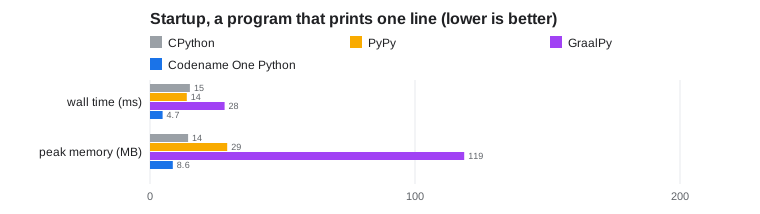
| Wall time (ms) | Peak memory (MB) | |
|---|---|---|
CPython 3.14 | 15.1 | 14.4 |
PyPy 3.11 | 13.9 | 29.1 |
GraalPy 3.13 | 28.2 | 118.6 |
Codename One | 4.7 | 8.6 |
Python kernels
Classic benchmark programs written for Python (scripts/python-bench/kernels),
fastest round in milliseconds, then peak memory in MB:
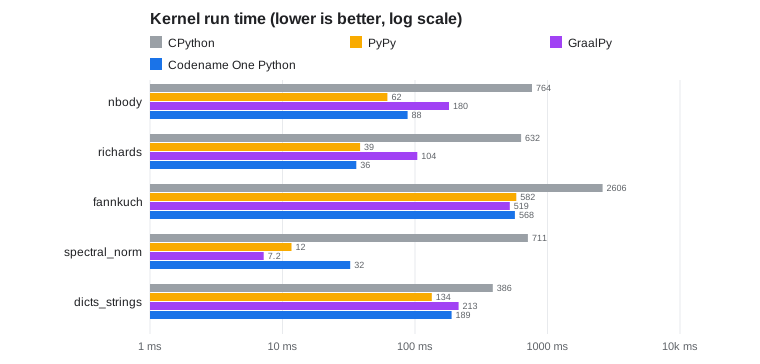
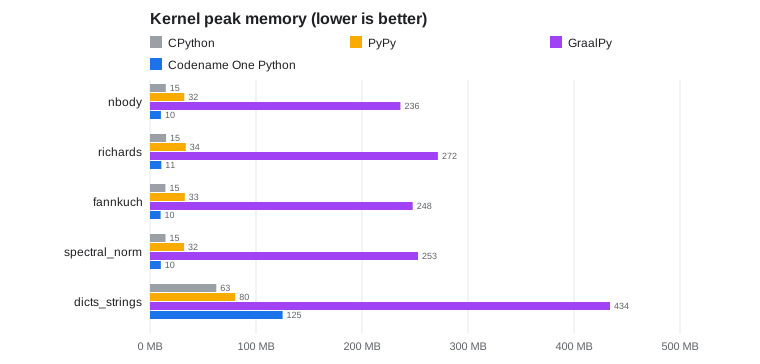
| Kernel | CPython 3.14 | PyPy 3.11 | GraalPy 3.13 | Codename One | ||||
|---|---|---|---|---|---|---|---|---|
nbody | 764 | 15 | 62 | 32 | 180 | 236 | 88 | 10 |
richards | 632 | 15 | 39 | 34 | 104 | 272 | 36 | 11 |
fannkuch | 2606 | 15 | 582 | 33 | 519 | 248 | 568 | 10 |
spectral_norm | 711 | 15 | 12 | 32 | 7.2 | 253 | 32 | 10 |
dicts_strings | 387 | 63 | 134 | 80 | 213 | 434 | 189 | 125 |
A Flask server
The Flask sample above, measured with ab -n 20000 -c 8 after a warm-up:
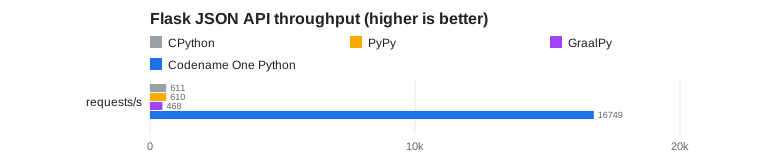
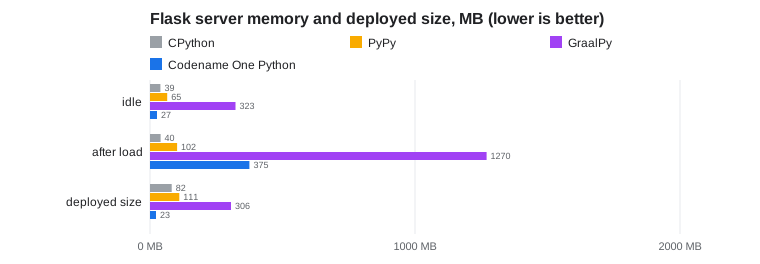
| First response (ms) | Requests per second | Idle memory (MB) | Memory after load (MB) | Deployed size (MB) | |
|---|---|---|---|---|---|
CPython 3.14 | 81 | 611 | 39.1 | 39.9 | 82.0 |
PyPy 3.11 | 184 | 610 | 64.8 | 102.3 | 110.5 |
GraalPy 3.13 | 438 | 468 | 322.8 | 1270.4 | 305.8 |
Codename One | 33 | 16,749 | 26.6 | 375.2 | 22.8 |
The deployed size is the interpreter’s installation plus Flask and its
dependencies, against the one executable. CPython, PyPy and GraalPy serve with
Werkzeug’s threaded server, which is what app.run() starts; a production
CPython deployment behind a WSGI server with several worker processes serves
more, using a full interpreter’s memory per worker. The Codename One server’s
heap grows under load and stays at that size, which is the memory after load
column; it doesn’t grow further on longer runs.
Where an application needs CPython instead: code that builds source text and
runs it with exec, and packages whose C code is the bulk of the package
rather than an accelerator under its Python, such as scipy or torch.
Replacing those means writing a numerical library in Java, not a few
functions.
Python against Java on Codename One
The workloads below are the ones every Codename One port is measured with,
com.bench.CommonWorkloads, ported line by line to Python in
scripts/python-bench/common. Each one returns a checksum, and every runtime
has to return the checksum Java returns, so all five columns compute the same
thing. The Python port reproduces Java’s 32 and 64-bit wrap-around with masks,
since a Python int never overflows.
The Codename One Java column is the Java original compiled by Codename One into the same executable. It’s the floor: the speed and memory Codename One reaches for this work when written in Java, and the target for the same program written in Python.
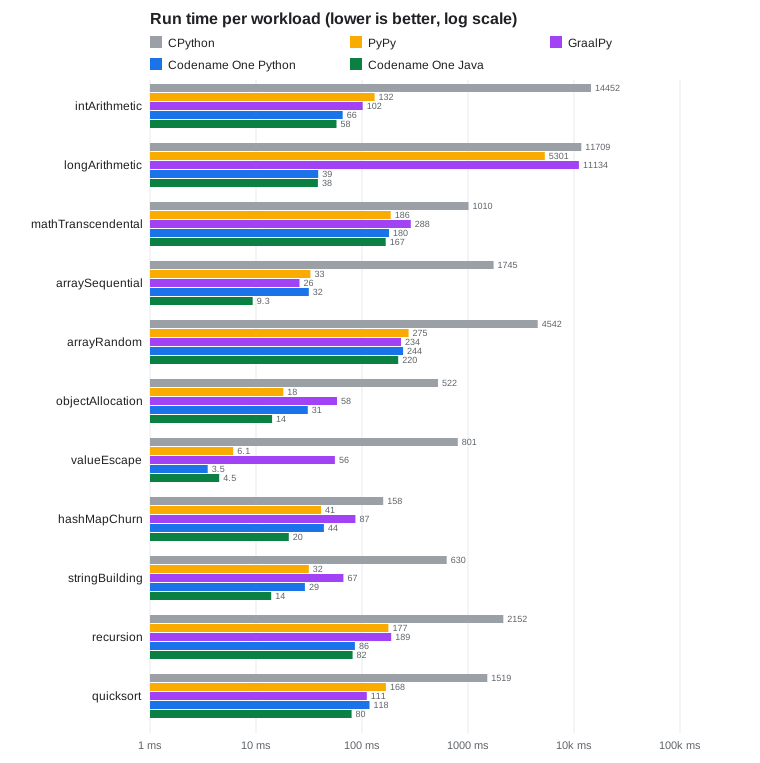
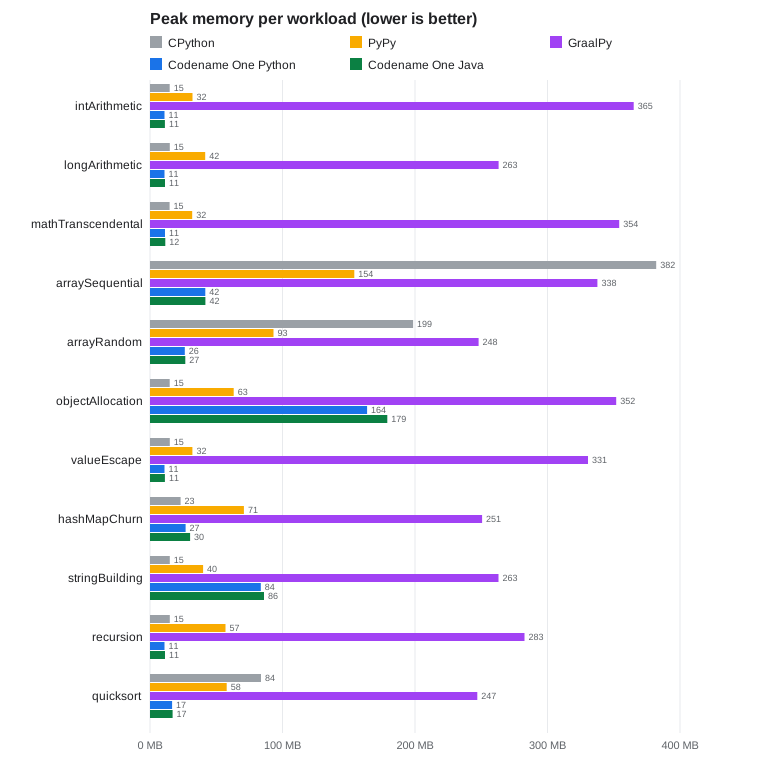
| Workload | CPython (ms, MB) | PyPy | GraalPy | Codename One Python | Codename One Java | |||||
|---|---|---|---|---|---|---|---|---|---|---|
| 14452 | 15 | 132 | 32 | 102 | 365 | 66 | 11 | 58 | 11 |
| 11709 | 15 | 5301 | 42 | 11134 | 263 | 39 | 11 | 38 | 11 |
| 1010 | 15 | 186 | 32 | 289 | 354 | 180 | 11 | 167 | 12 |
| 1745 | 382 | 33 | 154 | 26 | 338 | 32 | 42 | 9.3 | 42 |
| 4542 | 199 | 275 | 93 | 234 | 248 | 244 | 26 | 220 | 27 |
| 522 | 15 | 18 | 63 | 58 | 352 | 31 | 164 | 14 | 179 |
| 801 | 15 | 6.1 | 32 | 56 | 331 | 3.5 | 11 | 4.5 | 11 |
| 158 | 23 | 41 | 71 | 87 | 251 | 44 | 27 | 20 | 30 |
| 630 | 15 | 32 | 40 | 67 | 263 | 29 | 84 | 14 | 86 |
| 2152 | 15 | 177 | 57 | 189 | 283 | 86 | 11 | 82 | 11 |
| 1519 | 84 | 168 | 58 | 111 | 247 | 118 | 17 | 80 | 17 |
What the numbers say:
Python reaches Java’s memory. On every workload the compiled Python uses about the memory the Java program uses, and sometimes less: integers, floats and integer lists are held unboxed, a list of integers that fit 32 bits takes four bytes an item as a Java
int[]does, and objects that don’t escape a function are never allocated.And mostly its speed. Six of the eleven run within 15% of Java, among them the arithmetic, recursion and the transcendental math; the rest take 1.5 to 3.4 times as long. What remains is the cost of a Python
intbeing unbounded: where the compiler can’t prove a value stays within 64 bits, the generated code carries the check and a slow path Java doesn’t need.Against the interpreters. Codename One Python is the fastest of the four Python runtimes on six workloads and within 10% of the fastest JIT on three more, without a warm-up; GraalPy is faster at sequential array access and PyPy at allocating objects. It uses a third of PyPy’s memory and a twentieth of GraalPy’s on most of them.
longArithmeticmultiplies 64-bit values whose product needs 128 bits and masks it back: the interpreters compute it with arbitrary precision integers, and the compiler recognizes the wrap-around and computes it in a Javalong.
Tuning a hot spot in Java
A profile usually shows a handful of functions that dominate the run time. Any of them can be rewritten as a Java method in the same project and called from Python like any other Java class. The rest of the program stays Python.
The integer kernel in Python:
M32 = 0xFFFFFFFF

def i32(v: int) -> int:
    return ((v + 0x80000000) & M32) - 0x80000000

def int_arithmetic() -> int:
    a: int = 0x12345678
    b: int = i32(0x9E3779B9)
    checksum: int = 0
    for _ in range(40000000):
        a = i32((a * 1103515245 + 12345) ^ ((b & M32) >> 3))
        b = i32((b + a) * 5 - (a << 7))
        checksum += (a ^ b) & 0xFFFF
    return checksum + a + b
The same function in Java, under common/src/main/java:
package com.codenameone.developerguide.python;

public final class CommonWorkloads {
    public static long intArithmetic() {
        int a = 0x12345678;
        int b = 0x9E3779B9;
        long checksum = 0;
        for (int i = 0; i < 40000000; i++) {
            a = (a * 1103515245 + 12345) ^ (b >>> 3);
            b = (b + a) * 5 - (a << 7);
            checksum += (a ^ b) & 0xFFFF;
        }
        return checksum + a + b;
    }
}
And the Python that calls it:
from java.com.codenameone.developerguide.python import CommonWorkloads

checksum = CommonWorkloads.intArithmetic()
The Java int wraps by itself, so the masks disappear and the loop compiles
to a few machine instructions. In the run above that took the workload from
1.75 seconds to 65 milliseconds, faster than PyPy and GraalPy, in 11 MB.
Guidelines for choosing what to move:
Measure first. Only a loop that dominates a profile is worth a second language.
Move whole loops, not single operations. Every call across the boundary converts its arguments, so a Java method called once per element gains little; one called once per batch gains the most.
Pass primitive values and Java arrays where possible. A Python
listpassed to Java arrives as ajava.util.Listof boxed values.Annotate the Python that stays. Codename One compiles functions whose parameters and locals have known types (
int,float,bool,str, lists of them and classes withslots) to typed Java code. The rest takes the generic path, which is the one that CPython-like timings come from.